
SiteJet is a visual, AI-assisted website builder included free with every CanSpace hosting plan. No separate install, no additional license — launch it straight from cPanel and you're editing your site minutes later.
Why SiteJet?
- Built in to cPanel — no separate subscription, no app to install.
- AI-assisted — tell Sitejet a bit about your business and it drafts a starter site with content, images, and layout in a minute or two. You then customize.
- Drag-and-drop editor — click anything to edit, drag sections to rearrange, no code.
- Mobile-responsive by default — every template adapts automatically to phones and tablets.
- Stays on your domain — the finished site is served from your CanSpace hosting, SSL included, no redirects to a builder domain.
Launch SiteJet
-
Log in to cPanel and click Sitejet Builder — it appears in the left sidebar, and also as a tile in the Domains section of the dashboard.
-
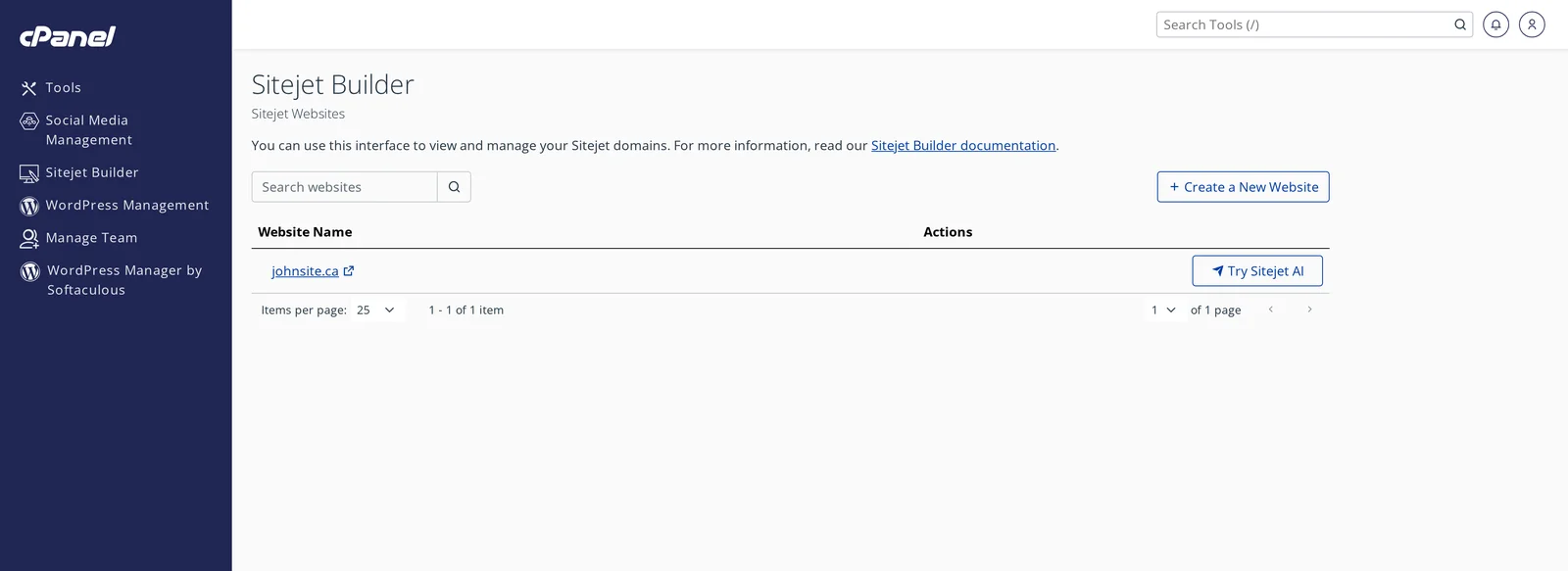
You'll land on the Sitejet Builder list. Each domain on your account appears here with an action button.
-
Choose how to start:
- Try Sitejet AI — describe your business in a few sentences and the AI generates a first draft. Best for "I just want something up quickly."
- Create a New Website — pick from a template library organized by industry (restaurants, portfolio, ecommerce, services, etc.) and customize from there.
-
The SiteJet editor opens in a new tab. Edit text by clicking it, swap images by uploading or picking from the built-in stock library, drag sections around, add new pages.
-
When you're ready, click Publish in the editor. Your site goes live on the domain within a couple of minutes.
What SiteJet is good for
- Small business websites — services, contact, about, gallery, basic portfolio pages. Most small businesses need exactly this.
- Landing pages — single-page marketing sites.
- Restaurants, tradespeople, professionals — the template library is strong here.
- Clients who don't want to touch code — SiteJet hides all the technical layer.
When to use WordPress instead
SiteJet is the fastest way to get online, but WordPress (also included free) is better when you need:
- A blog with tags, categories, scheduled posts, many authors
- E-commerce with hundreds of products (WooCommerce)
- A custom plugin or theme from a third party
- Long-term flexibility — WordPress sites can be moved to any hosting provider; SiteJet designs are tied to SiteJet (though the HTML/CSS output lives on your site)
If you're unsure, start with SiteJet. You can always migrate to WordPress later by installing it alongside or replacing the SiteJet site. See Install WordPress via Softaculous.
Custom domain, SSL, email
Because SiteJet runs on your CanSpace hosting account, everything just works together:
- Your domain is used automatically — no extra DNS setup.
- SSL / HTTPS is issued automatically by our AutoSSL system. See SSL at CanSpace.
- Email on the same domain works as usual ([email protected], etc.). SiteJet's contact form can route messages to any email address you choose.
Support and limits
SiteJet is included at no extra cost on all hosting plans. There's no page-count limit or traffic cap beyond your plan's standard bandwidth and storage. If you run into anything SiteJet-specific, our support team can help troubleshoot from our end — open a ticket.
Related articles
Have a question about a specific SiteJet feature? Open a support ticket